Free Microsoft SC-200 Security Operations Analyst Actual Exam Questions - Question 11 Discussion
HOTSPOT You have an Azure subscription named Sub1 and an Azure DevOps organization named AzDO1. AzDO1 uses Defender for Cloud and contains a project that has a YAML pipeline named Pipeline1. Pipeline1 outputs the details of discovered open source software vulnerabilities to Defender for Cloud. You need to configure Pipeline1 to output the results of secret scanning to Defender for Cloud, What should you add to Pipeline1? To answer, select the appropriate options in the answer area. 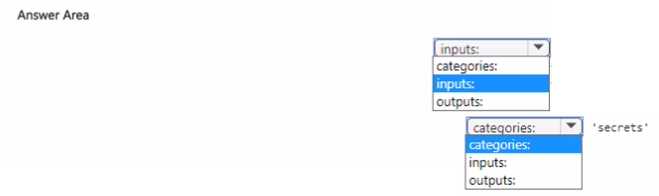
I think adding just the secret scanning task (B) won’t be enough—there must be a way to push those results to Defender. So probably need to add both the secret scan task and the publish step (like D) for the results to show in Defender.
Adding a task alone won’t send results; need to confirm publishing step too.
Adding the secret scanning task itself (option B) is definitely needed, but I’d also check if the pipeline outputs are configured to integrate with Defender for Cloud properly. Sometimes you need to add specific publish or reporting steps to actually send results downstream. Since the question focuses on outputting results, making sure the scan task runs is just part of it; the pipeline might also need a step that publishes or exports those results in the right format. If that’s not visible here, at least adding the scanning step is necessary to generate data in the first place.
Besides adding the secret scanning task (B), it’s important to ensure the pipeline has the right permissions to send data to Defender for Cloud. Without proper service connections or tokens, the output won’t reach the target.
B makes sense to add the actual secret scanning task, not just output results.
I think option B is the way to go. It explicitly adds a secret scanning task, which is exactly what’s needed here since just outputting data won’t run the scan itself.
Option B seems like the best fit because it explicitly adds the secret scanning task to the pipeline, which makes sense since the question says you need to output secret scanning results. Just enabling the open source scanner (Option A) won’t cover secrets. Option C mentions integration but doesn’t specify adding the scan step itself, so it might not trigger scanning. So adding the scanning task directly in Pipeline1 is necessary here.
Option D sounds right since it mentions enabling a secret scanning task explicitly, which is different from open source vulnerability scanning. Just outputting results won’t trigger the secret scanning itself.
I’m pretty sure just enabling the open-source vulnerability scan (like option A) won’t cover secret scanning. Looks like you need to explicitly add a secret scanning step or task—so option B fits better since it mentions the secret scan task.
Option C looks right since it mentions secret scanning integration.
I’m guessing the secret scanning needs a dedicated scanner step, so adding a task like “GitHub Security Scan” or similar would fit. Just outputting to Defender for Cloud doesn’t cover secret scanning alone.
I’m thinking the key here is to add a specialized task or step that specifically targets secret scanning, which isn’t covered by the open-source vulnerability scanning already in Pipeline1. So, option B makes sense because ‘Add a Scan for Secret Policies’ implies configuring the pipeline to check for secrets. It’s definitely not just about outputting existing results but actually running the scan itself. Option A looks like it’s about analyzing open-source code, so that wouldn’t add secret scanning. C and D are more about permissions or integrations, not running the secret scan directly.
Does Pipeline1 already include any scanning tasks for secrets or just open source vulnerabilities?