Free Microsoft Azure AI-102 Actual Exam Questions - Question 4 Discussion
DRAG DROP You have a web app that uses Azure AI search. When reviewing activity, you see greater than expected search query volumes. You suspect that the query key is compromised. You need to prevent unauthorized access to the search endpoint and ensure that users only have read only access to the documents collection. The solution must minimize app downtime. Which three action should you perform in sequence? To answer, more the appropriate actions from the list of actions to the answer area and arrange them in the correct order. 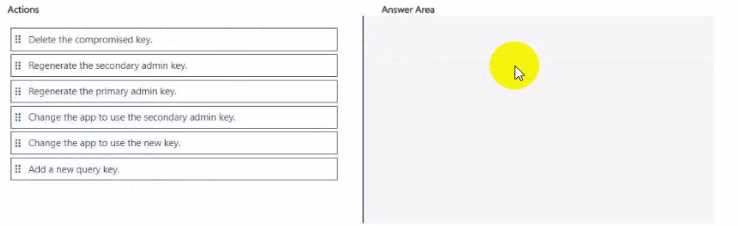
First, regenerate the compromised query key to stop unauthorized use. Then, update the app to use the new read-only query key to limit access. Lastly, enable Azure AD authentication for stronger, managed security without downtime.
I’d start by regenerating the compromised query key to immediately block unauthorized use (that cuts off the leak fast). Next, update the app to use the new read-only query key so users only get the permissions they need. Finally, enable Azure AD authentication to move away from query keys and improve security long-term without downtime. This order keeps the app running smoothly while tightening up access control step by step.
I’d go with regenerating the query key first to cut off the compromised one—that stops unauthorized access immediately. Then, updating the app to use a read-only query key keeps the permissions tight. Finally, configuring Azure AD authentication adds another security layer but won’t break the app since you already minimized downtime by handling keys first. This way you secure the endpoint step-by-step without downtime spikes.
Start with regenerating the query key to block old keys first.
Regenerate query key first, then enable Azure AD, finally update app config.
First regenerate the query key to cut off unauthorized access fast.
Start by regenerating the compromised query key to immediately block unauthorized use. Then enable Azure AD authentication to enforce read-only access. Finally, update the app to use the new authentication method without downtime.
Is this about regenerating the query keys or using Azure AD for access control? Also, do we know if the app supports managed identities yet?