Free Microsoft Azure AI-102 Actual Exam Questions - Question 11 Discussion
DRAG DROP You are developing a webpage that will use the Video Indexer service to display videos of internal company meetings. You embed the Player widget and the Cognitive Insights widget into the page. You need to configure the widgets to meet the following requirements: Ensure that users can search for keywords. Display the names and faces of people in the video. Show captions in the video in English (United States). How should you complete the URL for each widget? To answer, drag the appropriate values to the correct targets. Each value may be used once, more than once, or not at all. You may need to drag the split bar between panes or scroll to view content. NOTE: Each correct selection is worth one point. 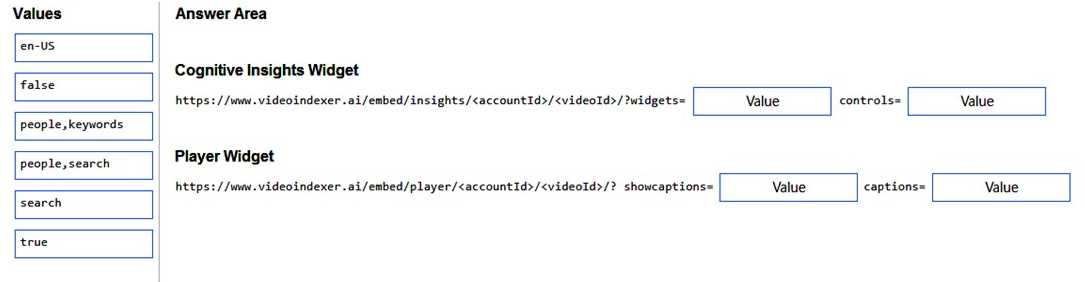
B for search keywords in Insights, Player handles faces and en-US captions.
I think for searching keywords, the Cognitive Insights widget definitely needs the parameter that enables search, so B fits there. For displaying names and faces, that’s handled by the Player widget, so it should have the right option for people insights. Regarding captions, since the question specifically says English (United States), it makes sense to use "en-US" for both widgets to ensure consistency, even if sometimes "en" might work. So I’d put “en-US” where captions are required on both widgets to be safe.
Search keywords need to be enabled in Cognitive Insights URL, so B fits best.
Option C for captions uses en-US, matching the requirement perfectly.
What’s the required language code format for captions here?