Free LPI 010-160 Actual Exam Questions
Dumps Box (DumpsBox) offers up-to-date practice exam questions for 010-160 certification exam which are developed and validated by LPI subject domain experts certified in LPI 010-160 . These practice questions are update regularly as we keep an eye on any recent changes in 010-160 syllabus, and when there is update our team quickly adjusts the questions. This commitment to providing the best quality exam prep material to certification aspirants is what makes DumpsBox.com the best certification exam prep website. On top of that, our strong, yet strictly moderated, community based feedback keeps the content clean and current. Each question has helpful community discussion that provides it extra perspective and introduces helpful resources for better exam preparation. This also saves students from other outdated practice questions or illicit exam dumps that can have adverse affects on career. Browse through our LPI 010-160 exam questions and pass your exam on first try.
Probably D. The /proc directory mainly holds directories named by PIDs for each running process, which fits option D perfectly. The other choices don’t really match what’s in /proc—there aren’t directories for installed programs or files for user accounts there. Device files are usually in /dev, and logs go in /var/log, so B and E don’t fit either. The key thing is that /proc is a virtual filesystem reflecting the current system state, especially processes.
D imo, the main structure is definitely one directory per running process, named by PID. The other files are more like system info, not matching options A, B, C, or E at all.
command
chmod 654 file.txt?
Maybe E makes the most sense since 654 translates to rw- for user, r-x for group, and r-- for others, which matches the permissions shown starting with a dash for a regular file.
E imo, the dash at the start is key—it indicates a regular file, not a directory, so we can drop A and B right away. Then looking at the numeric permissions: 6 means read/write (rw-), 5 means read/execute (r-x), and 4 means read only (r--). Only option E matches that exactly with -rw-r-xr--. The rest either have wrong bits set or wrong file type markers. So it’s gotta be E.
B/D? D is definitely out since wc counts words, lines, or bytes, not sorting. A and C don’t look like valid commands at all, and E’s grep doesn’t have a --sort option as far as I know. B is the only standard command for sorting files alphabetically, so I’d go with B here. If the question wanted something more specific about columns or case sensitivity, it would probably mention it explicitly.
A and C look fake, so B seems the only legit sorting command here.
No doubt it’s A and E here. Apache HTTPD and NGINX are the go-to web servers everyone knows. Postfix and Dovecot only handle email stuff, while Curl is just for making requests, not hosting anything. So those two stand out as the only real web servers listed.
A imo, both Apache and NGINX are known specifically as web servers.
#!/bin/bash echo $MYVAR
The following commands are used to execute this script:
MYVAR=value
./script.sh
The result is an empty line instead of the content of the variable MYVAR. How should MYVAR be set
in order to make script.sh display the content of MYVAR?
B, env sets MYVAR only for that command’s run, so the script sees it correctly.
B, env MYVAR=value ./script.sh works because env creates a new environment for the command with MYVAR set. The original MYVAR=value ./script.sh fails since it doesn't export MYVAR to the script's environment.
stored
on a DNS server?
B/D? The record type should be PTR, so D is tempting since it’s correct on that. But the domain should be in-addr.arpa, not .rev. B’s reversed IP looks right except for the typo. So it’s about which error is less bad.
B/D? The record type for reverse DNS is definitely PTR, so B or D seems right. But B has that weird “arpA” typo, which should be “arpa.” D uses “.rev” instead of “.arpa,” which doesn’t look standard either. Since the question might want the closest proper syntax, I’d say B is better despite the typo, because the reversed IP and in-addr.arpa format is the usual way it’s stored. The key is the PTR record and proper reversed IP under in-addr.arpa domain, so B fits best if we overlook the typo.
-rw-r—r— 1 root exec 24551 Apr 2 12:36 test.sh
The file contains a valid shell script, but executing this file using ./test.sh leads to this error:
bash: ./test.sh: Permission denied
What should be done in order to successfully execute the script?
B The file doesn’t have any execute permission set right now, so adding execute bit is the basic fix. Group membership won’t help if the execute bit for the group isn’t set either.
B, since none of the execute bits are set at all right now.
I was thinking about B and D because of the extra info, so they’re out. But what if hidden files aren’t needed? Then plain ls without -a might be better—none of the options show that though. Could A be overkill since it shows hidden files?
A vs C? C definitely shows detailed info like permissions and sizes, so it’s out. A just lists file names including hidden ones, so it fits the “file names only” part better.
parameters.)
The command to display manual pages is man. Info provides documentation but it’s not the same as traditional man pages, so man fits best here.
man is the only command that directly shows manual pages.
name without any values or parameters.)
-R is the only option that actually digs into subdirectories; lowercase -r is just for reversing the sort order. So it’s gotta be -R for recursive listing.
-R is the common flag for recursion in ls. Other options like -r just reverse order, so it doesn’t fit. The uppercase R is what triggers listing subdirectories recursively.
across multiple lines?
Backslash works because it escapes the newline, so line breaks don’t end commands.
Another way to think about it: semicolon and ampersand definitely don’t split commands across lines; they just separate or background commands. The only character that tells the shell to treat the next line as part of the same command is the backslash (\). So yeah, it’s really about signaling continuation, which only the backslash does here.
What keyword is used in a shell script to begin a loop? (Specify one keyword only, without any
additional
information.)
“for” is usually the default loop keyword in most shell scripts.
I’d go with “while” here since it’s another basic loop keyword that actually starts a loop in shell scripts. It fits the question as a single keyword without extra info, and it’s used pretty universally across shells. Since the question doesn’t specify which loop type or shell to focus on, “while” works as an independent answer from “for.”
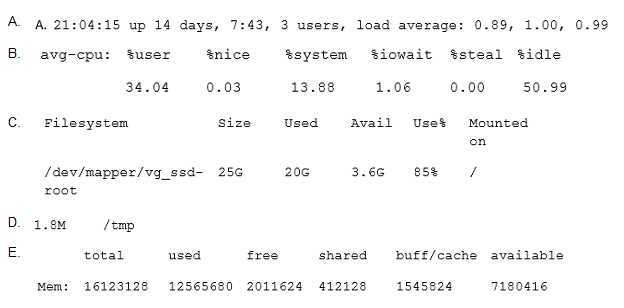
B/C? The output in B seems to have the right columns free usually shows, but C also looks pretty close with the buff/cache column. A and E look off because they have extra info or different units that free doesn’t show by default. Without a clear mention of flags like -h, I’d think it’s one of these two. If the values line up more cleanly under each header, that might push it toward C since it’s more like the newer free outputs I’ve seen.
Guessing D here. The output in D looks like it matches the classic free command, showing total, used, free, shared, buff/cache, and available columns in KB. The others either have unusual formatting or include units like MB or percentages. Without any flags like -h, free usually sticks to KB and that exact column arrangement. So I think D fits best as the standard free output.
B tbh doesn’t work because -- is used to signal end of options, not to handle spaces, so it won’t fix the space issue. A and E are clean since they handle space correctly, either by quoting or escaping.
I think A and E are the right picks here. A uses single quotes around the filename which handles the space fine, and E escapes the space with a backslash which also works. B is tricky because "--" usually means end of options, but here it's followed by a filename with a space and no quotes, so that might cause issues. D’s backslash inside single quotes won't escape the space, so that one won’t work. C is invalid syntax with those vertical bars. So yeah, A and E make sense to me.