Free Databricks-Certified-Associate-Developer-for-Apache-Spark-3.5 Actual Exam Questions
Dumps Box (DumpsBox) offers up-to-date practice exam questions for Databricks-Certified-Associate-Developer-for-Apache-Spark-3.5 certification exam which are developed and validated by Databricks subject domain experts certified in Databricks-Certified-Associate-Developer-for-Apache-Spark-3.5 . These practice questions are update regularly as we keep an eye on any recent changes in Databricks-Certified-Associate-Developer-for-Apache-Spark-3.5 syllabus, and when there is update our team quickly adjusts the questions. This commitment to providing the best quality exam prep material to certification aspirants is what makes DumpsBox.com the best certification exam prep website. On top of that, our strong, yet strictly moderated, community based feedback keeps the content clean and current. Each question has helpful community discussion that provides it extra perspective and introduces helpful resources for better exam preparation. This also saves students from other outdated practice questions or illicit exam dumps that can have adverse affects on career. Browse through our Databricks-Certified-Associate-Developer-for-Apache-Spark-3.5 exam questions and pass your exam on first try.
DataFrame A: 128 GB of transactions
DataFrame B: 1 GB user lookup table
Which strategy is correct for broadcasting?
B The key is avoiding shuffling the large DataFrame A, so broadcasting the smaller B is the move. Options involving broadcasting A don’t make sense given its size.
A vs B? Both push for broadcasting B since it’s smaller, but B is clearer about stopping the big DataFrame A from shuffling. That’s the key win here, so B’s explanation feels more on point.
too large to fit entirely in memory.
What is the likely behavior when Spark runs out of memory to store the DataFrame?
It’s C because Spark caches whole partitions and spills those that don’t fit to disk, so it stores as much as possible in memory first and the rest on disk with some overhead. Partial partition splitting isn’t how it works.
Probably C here. Spark caches partitions, and when memory is full, it spills entire partitions to disk rather than splitting a partition between memory and disk. This means it stores as much as it can in memory, then moves the rest to disk. D sounds tempting but Spark doesn’t track row-level frequency for caching, it works at the partition level mostly. B is definitely off since Spark isn’t balancing storage evenly, and A isn’t quite right because Spark doesn’t duplicate data both in memory and disk simultaneously. So C fits with how MEMORY_AND_DISK typically behaves under memory pressure.
44 of 55. A data engineer is working on a real-time analytics pipeline using Spark Structured Streaming. They want the system to process incoming data in micro-batches at a fixed interval of 5 seconds. Which code snippet fulfills this requirement?
A Spark’s processingTime trigger is designed exactly for fixed-interval micro-batches, so A makes the most sense. B’s continuous trigger is for a different streaming mode, not fixed micro-batch intervals.
A/D? D lacks a trigger, so it won’t guarantee 5-second intervals. A explicitly sets micro-batch timing with processingTime, which fits the 5-second fixed interval best.
strings into Spanish. The initial code is loading the model on every call to the UDF, which is hurting
the performance of the data pipeline.
The initial code is:
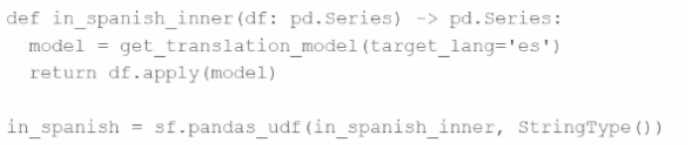
def in_spanish_inner(df: pd.Series) -> pd.Series:
model = get_translation_model(target_lang='es')
return df.apply(model)
in_spanish = sf.pandas_udf(in_spanish_inner, StringType())
How can the MLOps engineer change this code to reduce how many times the language model is
loaded?
It’s D because using an iterator UDF means the model loads once per partition and stays loaded across all batches, cutting down repeated reloads unlike the other options.
It’s D because using an iterator UDF lets you initialize the model once per batch instead of on every single call, which really cuts down the loading overhead compared to the other options.
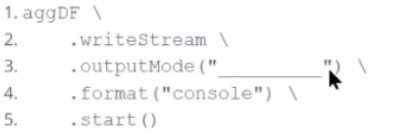
Which output mode at line 3 ensures that the entire result table is written to the console during each
trigger execution?
A/B? Append only adds new rows, so it can’t output the whole table. Complete mode outputs the full aggregation every trigger, which matches what the question asks. Options C and D don’t exist in standard Spark modes.
A, complete mode always outputs full aggregation results every trigger run.
df1 = spark.read.csv("sales_data.csv") # ~10 GB
df2 = spark.read.csv("product_data.csv") # ~8 MB
result = df1.join(df2, df1.product_id == df2.product_id)

Which join strategy will Spark use?
A imo, no AQE means static plan so no broadcast despite small df2 size.
B. Since df2 is just 8 MB, it’s well under the default broadcast threshold (usually 10 MB), so Spark should automatically pick a broadcast join here without needing hints or AQE. The fact that df1 is huge doesn’t matter as much as this small side table being eligible for broadcast.
What are the two alternative ways the developer can start a local Spark Connect server without
changing their existing application code? (Choose 2 answers)
B and A, since both --remote options start a local server without code changes.
A imo, since --remote "https://localhost" can also trigger a local Spark Connect server for testing. D and E require code changes, so they don’t fit the "without changing code" part.
cluster has 10 nodes, each with 16 CPUs. Spark UI shows:
Low number of Active Tasks
Many tasks complete in milliseconds
Fewer tasks than available CPUs
Which approach should be used to adjust the partitioning for optimal resource allocation?
A imo. Since the cluster has 10 nodes with 16 CPUs each, that’s 160 CPUs total. Setting partitions equal to total CPUs ensures each core gets a task, maximizing parallelism without overwhelming the cluster with too many tiny tasks. Options B and C seem arbitrary without tying directly to CPU count. D is good in theory, but partition size can vary depending on file format and compression—just dividing by 128 MB might not perfectly match CPU availability or task length. The key here is matching tasks to cores for better resource use.
It’s D because calculating partitions from data size usually avoids too few or too many tasks.
upstream team on a nightly basis. The data is stored in a directory structure with a base path of
"/path/events/data". The upstream team drops daily data into the underlying subdirectories
following the convention year/month/day.
A few examples of the directory structure are:
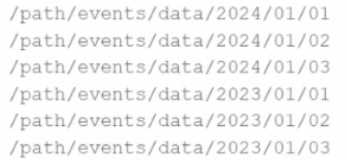
Which of the following code snippets will read all the data within the directory structure?
C imo, wildcard should catch all year folders without depending on Spark version.
Option C makes sense too since using a wildcard like /path/events/data/* should grab all first-level directories (the year folders) and Spark will then read all files inside those folders. It doesn’t rely on recursiveFileLookup, so it works regardless of Spark version. A and D just read the base path without recursion, so they probably miss nested files. B is good if the Spark version supports recursiveFileLookup, but since that info’s missing, C feels like a safer bet.
failures or intentional shutdowns by continuing where the pipeline left off.
How can this be achieved?
D, checkpointLocation in writeStream saves offsets and state for recovery.
I think A can be ruled out since checkpointLocation in readStream doesn’t store progress info needed for recovery. But is there any config beyond checkpointLocation in writeStream for handling metadata or query state?
result = df.coalesce(20)
How many partitions will the result DataFrame have?
A imo, coalesce only increases partitions if shuffle=True, which isn’t mentioned here.
It’s A, coalesce can’t increase partitions without shuffle, so stays 10 here.
A vs D? A is off since cache() can’t set storage level; it just uses a default. D fits better because cache() defaults to MEMORY_AND_DISK and persist() lets you specify other levels. That flexibility is really the key difference here. B and C mix up which method lets you choose storage levels, so not those either.
I’m thinking A can be ruled out since cache() doesn’t let you change the storage level, it just uses MEMORY_AND_DISK by default. Also, B is off because persist() definitely lets you pick levels, not just DISK_ONLY. Does D cover all the bases?
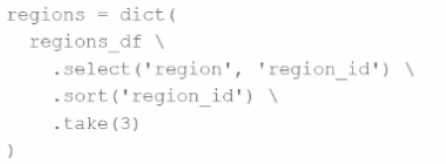
A developer needs to produce a Python dictionary using data stored in a small Parquet table, which looks like this: 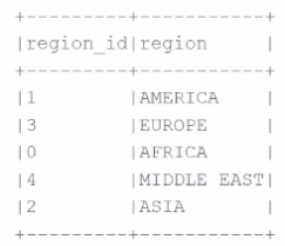 The resulting Python dictionary must contain a mapping of region -> region id containing the smallest 3 region_id values. Which code fragment meets the requirements? A)
  B)
B) 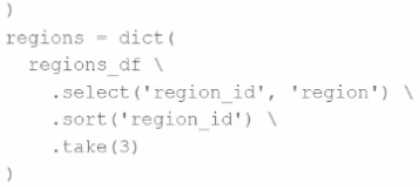 C)
C) 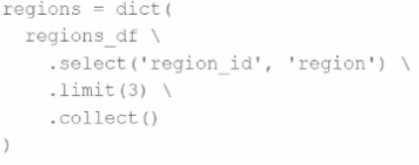 D)
D) 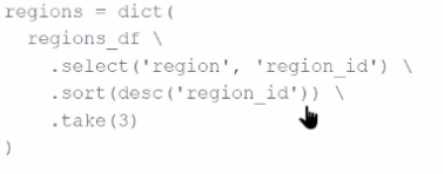 The resulting Python dictionary must contain a mapping of region -> region_id for the smallest 3 region_id values. Which code fragment meets the requirements?
B tbh, since it selects 'region_id' first then 'region', so when converted to dict it'll map region_id to region, which isn't what we want. A is better for region to region_id mapping after sorting ascending.
Option B also sorts by region_id ascending and selects columns in the right order for key-value pairs, so it fits the mapping. Just like with A, dict() might need tuples instead of Rows though.
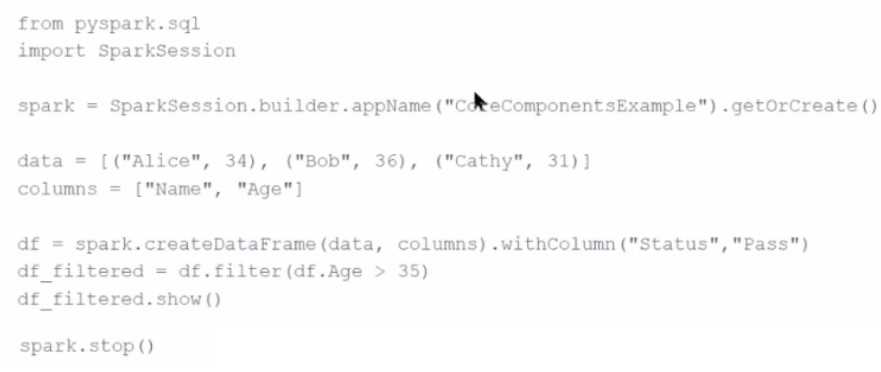
What is the role of the driver node?
D imo, B and C are clearly incorrect since the driver does way more than just UI or local computations. D is also wrong because the driver doesn’t store final results; it coordinates execution, so A fits best.
It’s A. The driver node is definitely the one that breaks down actions into tasks and schedules them on the workers. B’s just wrong because it’s more than monitoring. C is off since the driver doesn’t hold the data or run all computations itself. D’s not accurate either because the driver doesn’t store results after workers finish; it coordinates the whole thing. So yeah, “orchestrates” pretty much sums up scheduling plus sending tasks out.
A data scientist is working with a massive dataset that exceeds the memory capacity of a single
machine. The data scientist is considering using Apache Spark™ instead of traditional single-machine
languages like standard Python scripts.
Which two advantages does Apache Spark™ offer over a normal single-machine language in this
scenario? (Choose 2 answers)
It’s A for sure because Spark’s whole deal is spreading work across multiple machines, handling way bigger data than one computer can. I’d go with E too since normal scripts usually crash if a node fails, but Spark can retry tasks or reroute work so your job keeps running without losing progress. B and D are definitely out—Spark runs on regular hardware and you still write code. C’s not right either because Spark actually tries to keep data in memory to speed things up rather than just relying on disk.
A/C? Spark uses memory mostly but can spill to disk, so C partially fits.