Free Cisco 200-901 Actual Exam Questions
Dumps Box (DumpsBox) offers up-to-date practice exam questions for 200-901 certification exam which are developed and validated by Cisco subject domain experts certified in Cisco 200-901 . These practice questions are update regularly as we keep an eye on any recent changes in 200-901 syllabus, and when there is update our team quickly adjusts the questions. This commitment to providing the best quality exam prep material to certification aspirants is what makes DumpsBox.com the best certification exam prep website. On top of that, our strong, yet strictly moderated, community based feedback keeps the content clean and current. Each question has helpful community discussion that provides it extra perspective and introduces helpful resources for better exam preparation. This also saves students from other outdated practice questions or illicit exam dumps that can have adverse affects on career. Browse through our Cisco 200-901 exam questions and pass your exam on first try.
Fill in the blanks to complete the statement. Cisco DNA provide the capability to send an HTTP _______________ request to the API endpoint https://DNA-c_API_ADDRESS/api/vi/network-device/ and receive the network __________ list in __________ format.
The request is definitely GET since we're fetching data, and JSON is the usual response format for Cisco APIs. For the list, "network device" fits better than just "device" based on typical endpoint naming.
The first blank is definitely GET since it's about fetching data. For the second blank, I'd say "device" as well because the URL points to network-device, so it's likely returning device info. The last blank should be "JSON" since APIs usually respond in JSON format.
Makes sense to pick B since the whole point is to automate as much as possible. Fixed schedules (C) or manual steps (A) kinda go against the fast feedback loop idea.
It’s B because the main goal is automation and reducing manual steps as much as possible to make deployments faster and more reliable. Manual testing (A) slows things down.
DRAG DROP Drag and Drop the GIT commands from the left onto the right that add modified local files to a remote repository. Not all options are used 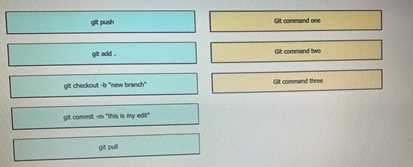
I’d say git add and git push are the main ones here. Git add stages the changes, and git push sends them to the remote repo. Git commit isn’t listed, so no commit step in this drag-and-drop.
git push is the only command here that actually sends changes to the remote repo.
D E make the most sense here. Tracking code revisions and letting new team members catch up with history are classic version control perks. A’s tricky since binary files aren’t always well handled.
A/D? D and E seem solid, but I’m thinking about A too. Even if some systems don’t handle binaries perfectly, many version control tools do support tracking changes in binary files to some extent. That could be a valid advantage depending on the software. Since D is definitely a core function and A at least partially fits, I’m splitting between those two. E sounds good but feels more like a side benefit than a main advantage.
DRAG DROP Drag and drop the function on the left onto the type of plane that handles the function on the right. 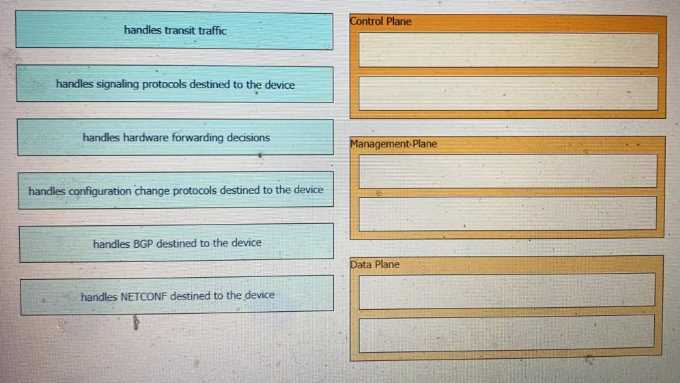
Also, remember the management plane is more about network-wide policies and monitoring, so functions like SNMP or logging fit there, not the ones that make real-time forwarding decisions or route calculations.
I think the key here is recognizing what each plane type is designed for. For example, control planes handle decisions and routing protocols, so functions like OSPF or BGP would fit there. Data planes are all about forwarding traffic, so anything dealing with packet movement matches up. Management planes handle config and monitoring, so functions like SNMP or SSH should go there. If you match the function based on what the plane’s purpose is rather than just the name, it becomes clearer. The image probably tries to link functions like “routing protocol” with control plane and “packet forwardin
DRAG DROP 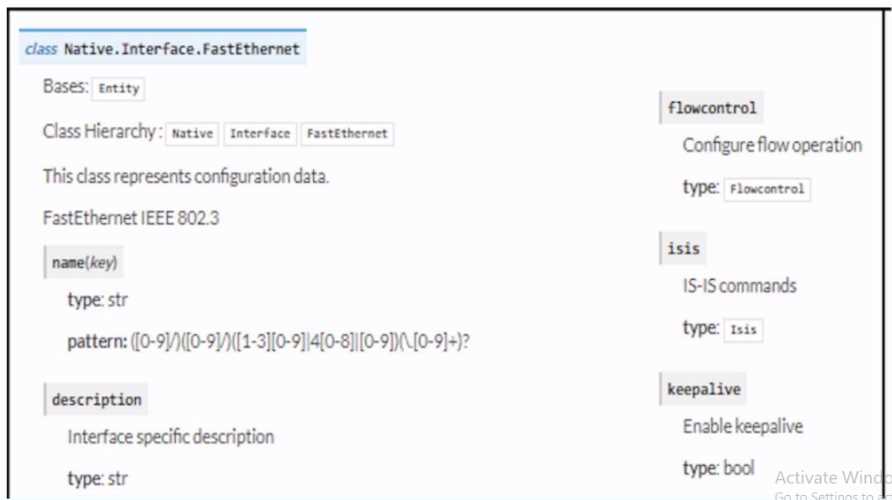 Refer to the exhibit. Drag and drop the code snippets from the bottom to the blanks in the code to enable keepalive for the FastEthernet 2/0 interface. Not all options are used.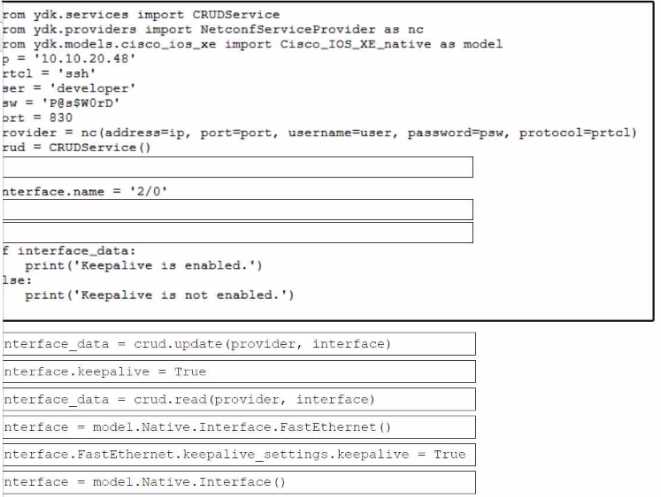
I think B and C are the way to go here. B looks like the command that actually enables keepalive on the interface, and C sets the interval, which is essential for keepalive to work. D might just be showing the default or clearing counters, so it’s probably not needed. A doesn’t seem related to keepalive at all. So, B first to turn it on, then C to adjust the timer seems like the proper sequence and fits what the question asks.
C then D, since those set the keepalive interval and enable it properly.
DRAG DROP Drag and drop the Docker file instructions from the onto correct descriptions on the right. Not all options are used. 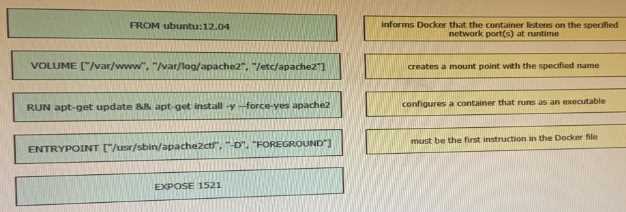
I noticed that the question mentions dragging Dockerfile instructions onto their descriptions, but not all options are used. Since ENTRYPOINT and CMD aren’t in the list, those can be ruled out for matching. FROM definitely lines up with selecting the base image, and COPY matches moving files into the image. RUN is for executing commands during build, so it fits with running installation or setup commands. The key is to focus on what each instruction does in the build process rather than container runtime behavior. That helps eliminate the unused choices easily.
COPY is definitely for adding files, so that matches the file transfer description.
Routing protocol traffic is basically the messages exchanged to build routing tables, which happens in the control plane, not just device management stuff. So, D makes the most sense here.
Maybe B since routing protocol traffic involves device communication, not just route calculation.
Not A, because ICMP is mainly for ping and error messages, not time sync. Since NTP uses UDP port 123, C is the right pick to let those packets through the firewall.
D imo, the key here is knowing NTP uses UDP, not TCP. So option C fits best. ICMP and BGP don’t deal with time synchronization, so those can be ruled out easily. The main takeaway is that NTP traffic runs over UDP port 123, which needs to be allowed through the firewall for it to work properly.
D. Routing tables list where to send packets next, which means next hop or outgoing interface. The other options are more about packet details, not routing decisions.
Option D makes the most sense because routing tables focus on forwarding paths, not on transport layer details like ports or protocols. Options A and C are more about packet content, not routing decisions.
two.)
C/D? A listener waits for events, and a receiver actively gets the webhook data.
Maybe C and D, but does it specify the app's role clearly?
DRAG DROP Refer to the exhibit. Drag and drop the code snippets from the bottom onto the blanks in the Python script to retrieve a list of network devices from Cisco DNA Center. Not all options are used. 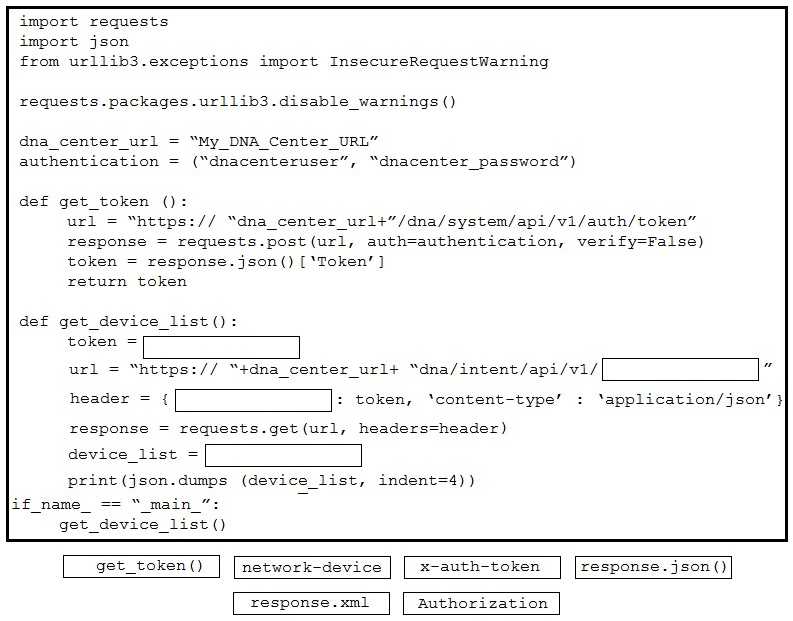
I’d pick the snippet with dnac.devices.get_device() since it directly fits the blank after creating the DNACenter object. Snippets about token or headers aren’t needed here because auth is already handled.
I’d drop anything that looks like it’s handling authentication or token fetching separately since the code already has a DNACenter object. Focus on snippets that just call get_device() directly after.
predetermined security rules?
B tbh, routers do direct traffic between different networks and can have basic filtering features like ACLs, but they’re not primarily focused on enforcing detailed security policies. Firewalls are specifically built to monitor and control traffic based on security rules, which sets them apart from routers and switches. Load balancers just distribute workload, no real filtering. So while routers handle some traffic control, the key thing here is security-based traffic control, which points to C, the firewall.
C imo. Firewalls are the only ones that actually enforce security policies by filtering traffic based on rules. Switches just connect devices, routers direct traffic between networks, and load balancers distribute traffic loads but don’t check security rules. So if the question is about monitoring and controlling for security, it’s got to be the firewall.
Fill in the blanks to complete the cURL command that invokes a RESTful API to retrieve a resource in JSON format using OAuth. 
B makes sense since it uses GET and explicitly requests JSON with Accept header.
I’m thinking option B again because the Accept header ensures the response is JSON, which matches the question’s requirement. The other options miss that detail or use the wrong method.
infrastructure must be running at all times and have access to APIs. Which Cisco DevNet source must
the engineer use?
Maybe B could be right because Code Exchange offers ready-to-use code that might include persistent environments or tools for continuous API testing, unlike just docs or labs.
Sounds like C fits best since Sandboxes provide live environments with APIs ready to use constantly. But could D be useful if the focus is strictly on API details, not infrastructure uptime?